When you Track a property or person within Remine, you can also create and apply labels to that particular opportunity that can help you identify it going forward. For instance, you can apply a great location or waterfront label to a tracked property. Remine allows you to search through all of your tracked opportunities based on labels that you have assigned them.
Click the Track button in the upper right:

Then click the Labels icon on the left side of the screen:
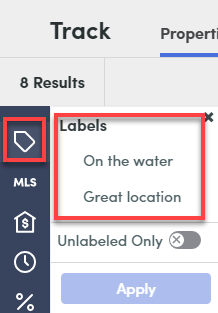
It will display any Labels you have created yourself- you can select any of them (including more than one at a time) and hit Apply to see all opportunities you have tagged with those labels. If you select more than one label, it functions as an or scenario- it will find all matches that have any of the labels attached to them. For a match to come up, it does not have to have all selected labels, just one of them.
You could also select Unlabeled Only to see only those opportunities that you have not labeled at all.
Comments
Please sign in to leave a comment.